The feeling of losing a Vivo phone can be very stressful, more so when it holds some significant photos, contacts, and personal information. Luckily, we can locate vivo phone quickly with the help of trusted tools, third-party services, and official tracking services. No matter whether your phone is online, offline, or even switched off, this guide will help you track and secure your Vivo phone in a step-by-step manner.
How to Find My Lost Vivo Phone?
In case your Vivo phone is lost, you can locate it using various useful tools offered by Vivo, Google, the network, and third-party applications. Such tools assist you in finding the location of the phone, locking it, deleting information, or showing a message to recover the phone.
Use Vivo Find My Device
Google Find My Device is compatible with vivo smartphones. It enables you to find your phone on a map, play a tune, lock your phone, or even delete data remotely. You are also capable of seeing battery status and network information.
You need your Google account and internet connectivity with this tool. It operates regardless of whether your phone is in silent mode. You may also leave a personalized message on the lock screen to make someone give back your device.
Steps
- Go to Google Find My Device and sign in.
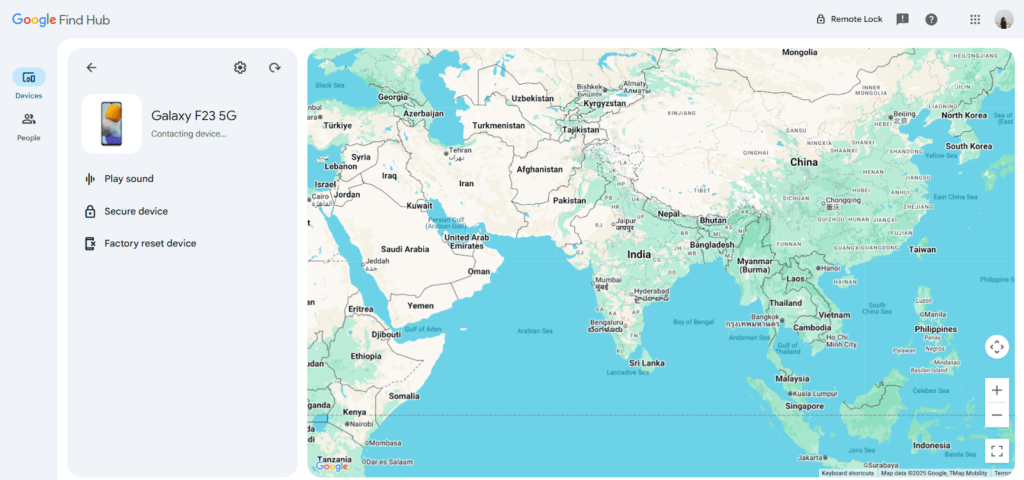
- Select your lost Vivo phone from the list.
- Check the location on the map.
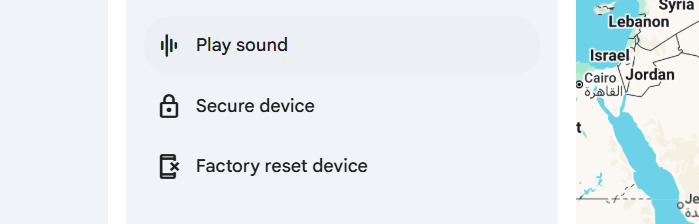
- Use options like “Play Sound,” “Secure Device,” or “Erase Device” depending on your situation.
Via Google Maps
Google Maps Timeline allows viewing the history of movement of your Vivo phone. Although the device may not be connected to the network at the moment, you can observe the last location. The feature can only operate when your Google account and location history are turned on before using your Vivo device. It assists you in retracing the trails to refine potential areas. To determine the last time your phone was on, you can also look at timestamps to be certain.
Steps
- Open Google Maps and sign in.
- Go to “Your Timeline.”

- Select the date when the phone was lost.
- Review the movement path and last seen location of your Vivo phone.
Track with IMEI Number
Each Vivo phone is assigned an exclusive IMEI number that enables the authorities and network operators to trace it. IMEI will help you locate the phone on the network, a number that the police or telecom providers will then use to block or trace the phone when there is an urgent need to do so. This method is useful if your phone is switched off or the SIM card is removed. Keep your IMEI number stored safely so you can report it immediately.
Steps
- Find your IMEI from the phone box or your Google account.
- Visit your nearest police station.
- File a complaint and provide IMEI details.
- Let authorities coordinate with network operators for tracking or blocking your device.
Use Phone Tracker by Number
Cellphone Location is a highly developed phone number locator that offers precise GPS-based geolocation across the entire globe. It has a straightforward interface, and it can be used on any device or carrier without needing a specific app. The tool uses a combination of GPS, WiFi, and cell tower technology to locate positions accurately.
It helps in safety checks, tracking of lost phones, and legal and consent-based location sharing, which is useful to families, people engaged in travel, and those who require real-time location data.
Steps
- Visit Cellphone Location.
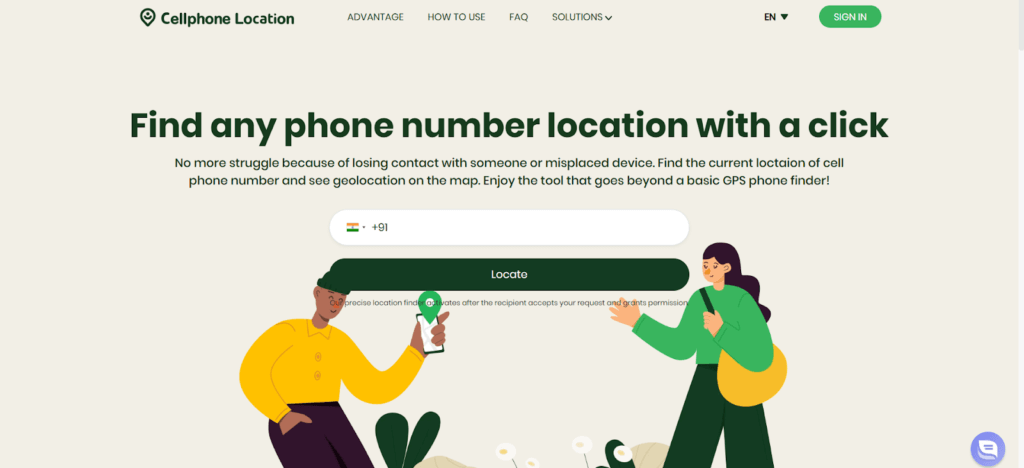
- Enter the mobile number of your Vivo phone.
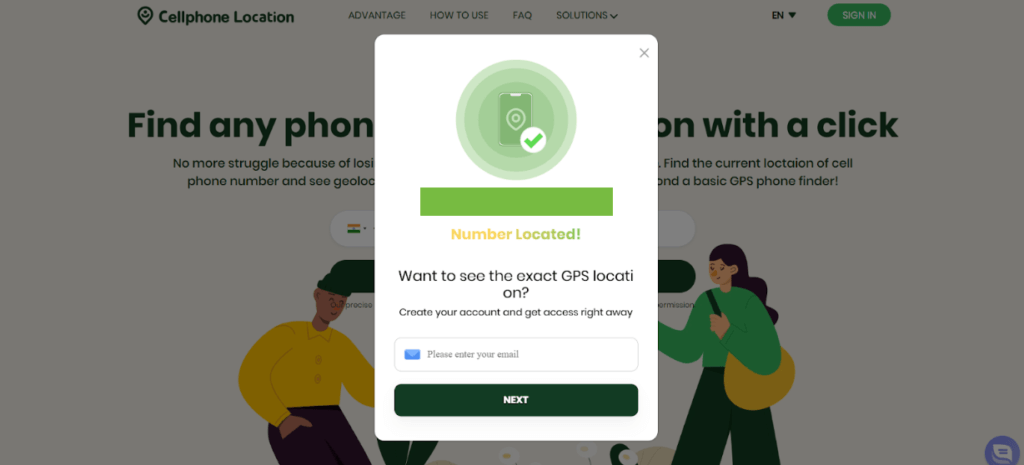
- Now, provide your email address to receive the details and allow the system to scan databases.
- Check the generated location report and follow the instructions for device recovery.
Contact Service Provider
With the help of SIM and IMEI numbers, your network service provider can track or block your Vivo phone. They may disable the SIM in order to stop abuse, replace it, and collaborate with law enforcement in case of a device that seems to be on their network. This increases the probability of recovery.
Steps
- Call your provider’s customer service.
- Share your phone number and IMEI details.
- Request SIM blocking and tracking support.
- Follow their guidance for further recovery steps or official complaint procedures.
What to Do If the Vivo Phone Is Offline?
When your Vivo phone is offline, tracking becomes harder, but not impossible. You can still use saved data, security tools, and remote features to protect your device and improve recovery chances.
- Check Last Known Location
Use Google Find My Device or Google Maps Timeline to view the phone’s last recorded position before it went offline. This helps you understand where the device was last active and narrow your search.
- Display a Message With Contact Info
Activate the “Secure Device” feature in Find My Device Vivo to lock the phone and show a custom message. Adding your contact number increases the chances that someone will return the device if found.
- Remotely Erase the Device
If you believe the phone is stolen or unrecoverable, use the “Erase Device” option to wipe all data. This ensures your personal information, photos, and accounts stay safe even if the device isn’t found.
FAQs
- Can I track my Vivo phone if Location is turned off?
Tracking becomes limited, but you can still see the last known location recorded by Google services before the phone went offline.
- Can I locate my Vivo phone without an internet connection?
Real-time tracking is not possible, but tools like Google Maps Timeline may show older location data saved when the device was online.
- Is it possible to track my Vivo phone after a factory reset?
No. Once a phone is reset, all accounts, settings, and tracking features are removed. You must rely on IMEI tracking through police or service providers.
Conclusion
Finding a lost Vivo phone is possible using Google tools, tracking websites, IMEI support, and service-provider assistance. Acting quickly increases your chances of recovering the device. Even if the phone is offline, you can still secure your data or check its last known location. With the right steps, you can find Vivo phone location and protect both your device and your privacy.
 English
  Portuguese