O Pinterest é uma plataforma inspiradora e uma rede social onde usuários, amigos e marcas podem se conectar. Caso precise encontrar alguém no Pinterest, ele oferece diversos métodos, tanto integrados quanto externos. Este guia apresenta nove maneiras úteis de encontrar alguém no Pinterest, apesar da falta de informações disponíveis.
Como pesquisar alguém no Pinterest?
Encontrar uma pessoa no Pinterest não é difícil, desde que você saiba onde procurá-la. O Pinterest também oferece uma variedade de recursos de descoberta, incluindo busca direta e integração com redes sociais. Isso significa que você pode encontrar usuários mesmo sem saber o nome exato deles na plataforma.
Pesquisar por nome ou nome de usuário
A maneira mais direta de encontrar alguém no Pinterest é pesquisando pelo nome ou nome de usuário na barra de pesquisa da plataforma. Essa é uma forma rápida quando a pessoa tem um perfil público e usa seu nome real. Isso é útil para criadores de conteúdo, empresas ou usuários que utilizam nomes de usuário semelhantes em diversas redes sociais.
Passos:
- Abra o Pinterest e faça login na sua conta.
- Clique na barra de pesquisa na parte superior da tela.
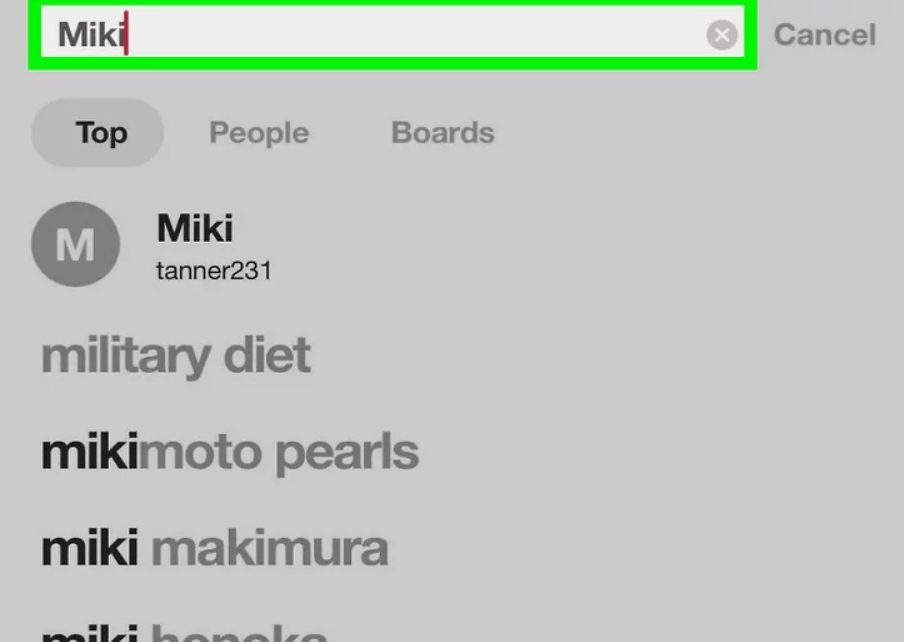
- Digite o nome ou nome de usuário da pessoa.
- Filtre os resultados por "Pessoas" para refinar a busca.
Sincronize seus contatos
O Pinterest permite que os usuários adicionem contatos telefônicos para encontrar pessoas que já são usuárias. Essa é uma maneira eficaz quando a pessoa associou sua conta ao mesmo e-mail ou número de telefone salvo na sua agenda. É um método mais prático para encontrar amigos, colegas ou conhecidos sem precisar pesquisar cada perfil separadamente.
Passos:
- Acesse as configurações do Pinterest no seu perfil.
- Selecione a opção para sincronizar contatos.
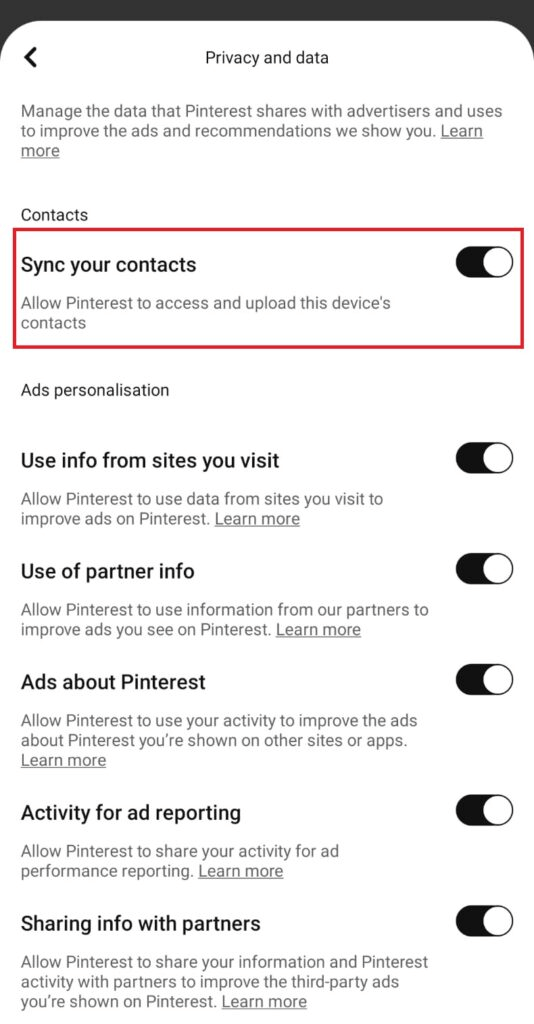
- Permita o acesso aos contatos quando solicitado.
- Analise os perfis sugeridos que correspondem aos seus contactos.
Encontre uma pessoa no Pinterest pelo endereço de e-mail.
Quando alguém cria uma conta no Pinterest usando seu endereço de e-mail, existe a possibilidade de o site sugerir o perfil dessa pessoa em seus contatos ao integrá-los. A busca direta por e-mail é restritiva, mas ainda útil em alguns casos. As configurações de privacidade determinam os resultados, mas adicionar contatos torna a pessoa mais visível quando a conta de e-mail é publicamente identificável.
Passos:
- Salve o endereço de e-mail da pessoa em seus contatos.
- Ative a sincronização de contatos nas configurações do Pinterest.
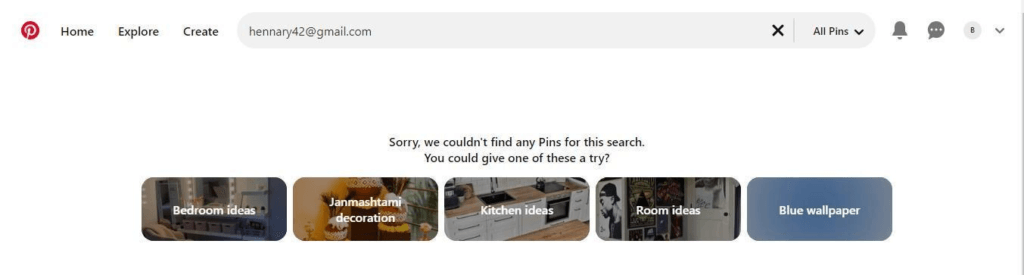
- Atualizar contas sugeridas.
- Verifique se há perfis correspondentes nas recomendações.
Use o código QR/PIN.
O Pinterest oferece um sistema semelhante a um QR Code chamado Pincode, que redireciona para o perfil do usuário. Essa é uma maneira rápida e precisa de identificar o PIN caso a pessoa o revele. Os Pincodes são mais adequados para compartilhamento físico e são usados em eventos de networking profissional ou para identificar criadores de conteúdo.
Passos:
- Abra o Pinterest e clique no ícone de pesquisa.
- Toque na opção de câmera ou digitalização.
- Escaneie o código PIN compartilhado do Pinterest.
- Abra o perfil vinculado ao código.
Conecte-se pelo Facebook
O Pinterest permite que os usuários conectem suas contas do Facebook. Se ambos tiverem vinculado o Facebook ao Pinterest, a plataforma poderá recomendar automaticamente o perfil da pessoa. Esse recurso ajuda a se reconectar com amigos que já fazem parte do seu círculo social sem precisar procurá-los manualmente.
Passos:
- Abra as configurações do Pinterest e conecte-se ao Facebook.
- Permitir a sincronização de contas.
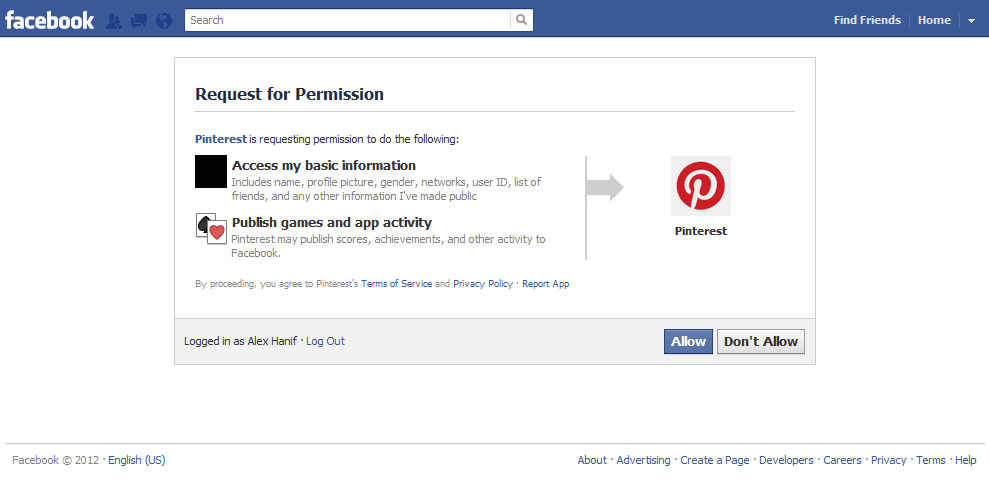
- Acesse os perfis sugeridos em “Descobrir pessoas”.
- Siga os contatos correspondentes do Facebook exibidos.
Utilize o recurso sugerido
O recurso "Sugestões para você" do Pinterest recomenda pessoas com base na sua atividade, interesses e conexões. Esse método é útil para encontrar criadores de conteúdo ou conhecidos com gostos semelhantes. As sugestões melhoram com o tempo, à medida que o Pinterest aprende suas preferências por meio de pins, pesquisas e pastas salvas.
Passos:
- Acesse seu perfil no Pinterest.
- Abra a seção “Descobrir pessoas” ou a seção de sugestões.

- Navegue pelos perfis recomendados.
- Siga usuários que pareçam relevantes ou familiares.
Pesquisar por interesses e fóruns
Se você conhece os interesses de alguém, pode pesquisar palavras-chave relacionadas e explorar fóruns públicos. Muitos usuários dão nomes únicos aos seus fóruns, o que facilita encontrar seus perfis indiretamente. Essa abordagem funciona bem para entusiastas, blogueiros ou criadores que organizam e publicam ativamente fóruns temáticos.
Passos:
- Pesquise por um tópico ou palavra-chave de seu interesse.
- Abra os fóruns relevantes a partir dos resultados da pesquisa.
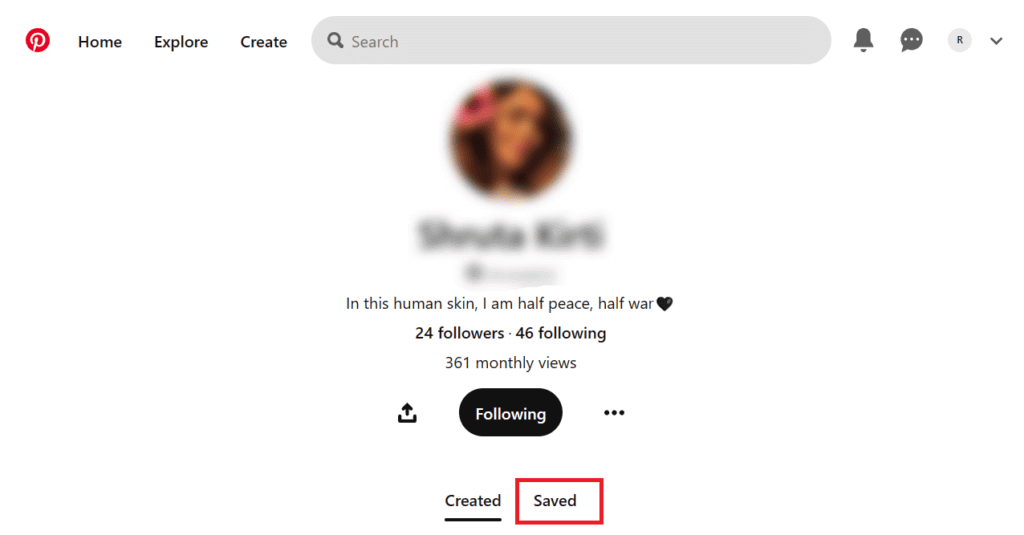
- Clique no perfil do criador do quadro.
- Verifique se corresponde à pessoa que você está procurando.
Verificar listas de seguidores ou pessoas que segue
Se você compartilha conexões em comum no Pinterest, verificar as listas de seguidores ou pessoas que esses usuários seguem pode ajudar a encontrar a pessoa indiretamente por meio de redes compartilhadas. Conexões em comum aumentam a precisão, especialmente ao pesquisar em comunidades de nicho ou grupos de interesse profissional.
Passos:
- Abra o perfil do Pinterest de um contato em comum.
- Clique na lista de seguidores ou na lista de pessoas que elas seguem.
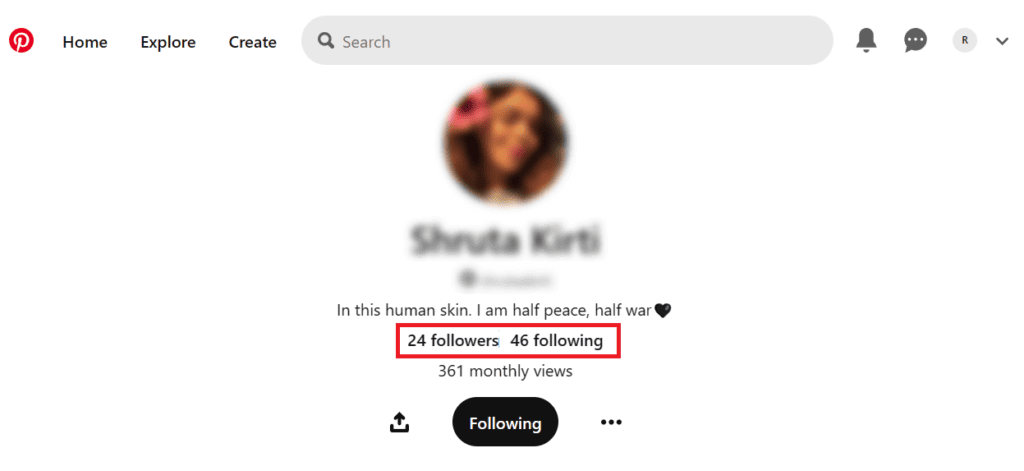
- Navegue pelos nomes de usuário ou faça buscas manualmente.
- Abra perfis que lhe pareçam familiares.
Adicionar nome de usuário ao URL e pesquisar
Os perfis do Pinterest seguem um formato de URL padrão. Se você suspeitar de um nome de usuário, adicioná-lo à URL do Pinterest pode levar diretamente ao perfil, desde que a conta seja pública. Esse método é especialmente útil quando os nomes de usuário são simples ou semelhantes em plataformas como Instagram, Twitter ou Etsy, permitindo uma verificação de perfil mais rápida sem usar os filtros de busca do Pinterest.
Passos:
- Abra seu navegador.
- Digite pinterest.com/nome de usuário.

- Substitua “username” pelo nome suspeito.
- Pressione Enter e verifique se o perfil existe.
Problemas comuns ao pesquisar pessoas no Pinterest
Às vezes, encontrar alguém no Pinterest pode ser um desafio devido às configurações de privacidade ou às informações limitadas do perfil, mesmo usando os métodos de busca corretos.
- Perfil privado ou restrito: O usuário pode ter visibilidade restrita, dificultando a localização de sua conta.
- Nome comum ou nome de usuário: Nomes populares podem gerar muitos resultados, dificultando a identificação.
- Perfis incompletos: A ausência de fotos, biografias ou perfis reduz a precisão e o reconhecimento nas buscas.
Outras maneiras de encontrar alguém no Pinterest
Se as ferramentas integradas do Pinterest não funcionarem, métodos externos podem ajudar a descobrir o perfil de um usuário, especialmente quando se tem informações parciais, como links, números de telefone ou presença online.
Solicite um link direto para o seu perfil.
Pedir diretamente o link do perfil do Pinterest de alguém é o método mais rápido e confiável. Isso elimina a incerteza causada por nomes semelhantes, perfis privados ou contas inativas. Os links de perfil do Pinterest abrem instantaneamente e garantem que você se conecte com a pessoa certa. Essa abordagem funciona especialmente bem para amigos, colaboradores, clientes ou criadores com quem você já se comunica fora da plataforma.
Use o Google para encontrar um perfil do Pinterest.
Os mecanismos de busca costumam indexar perfis, pastas e pins públicos do Pinterest. Quando a busca interna do Pinterest falha, o Google pode revelar perfis vinculados a nomes, marcas ou tópicos de conteúdo. Esse método é eficaz para encontrar criadores, empresas ou blogueiros que publicam ativamente pastas públicas e pins otimizados na plataforma.
Passos:
- Abra a pesquisa do Google.
- Digite o nome da pessoa seguido de “Pinterest”.

- Analise o perfil e os links para os fóruns nos resultados.
- Clique nos links relevantes para confirmar sua identidade.
Pesquisar por número de telefone
Ferramentas de busca reversa de números de telefone Às vezes, é possível revelar perfis públicos em redes sociais associados a um número de telefone. Se um usuário vinculou seu número a contas online, essas ferramentas podem exibir referências relacionadas ao Pinterest. Serviços como o CellPhone Location ajudam a analisar dados disponíveis publicamente, embora os resultados dependam inteiramente do que o usuário compartilhou online.
Passos:
- Acesse o site de busca reversa de números de telefone.
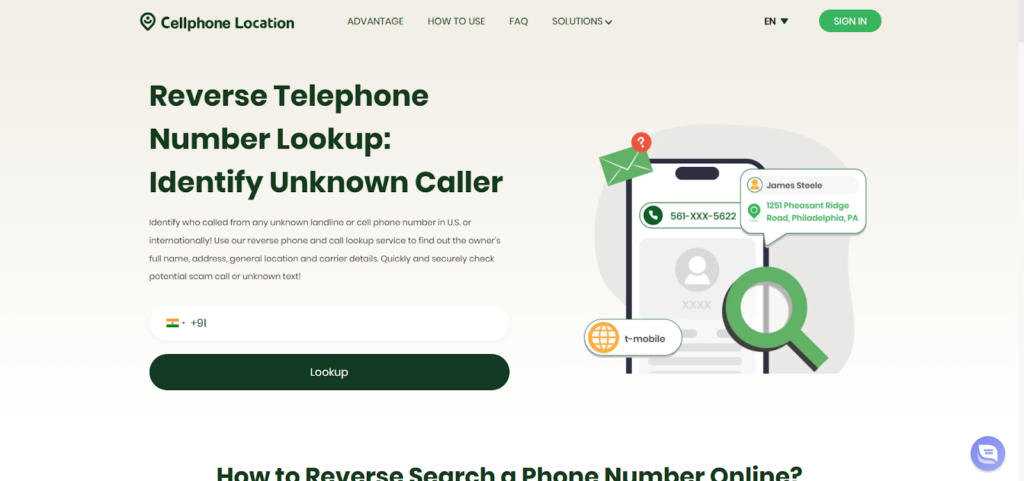
- Digite o número de telefone com o código do país.
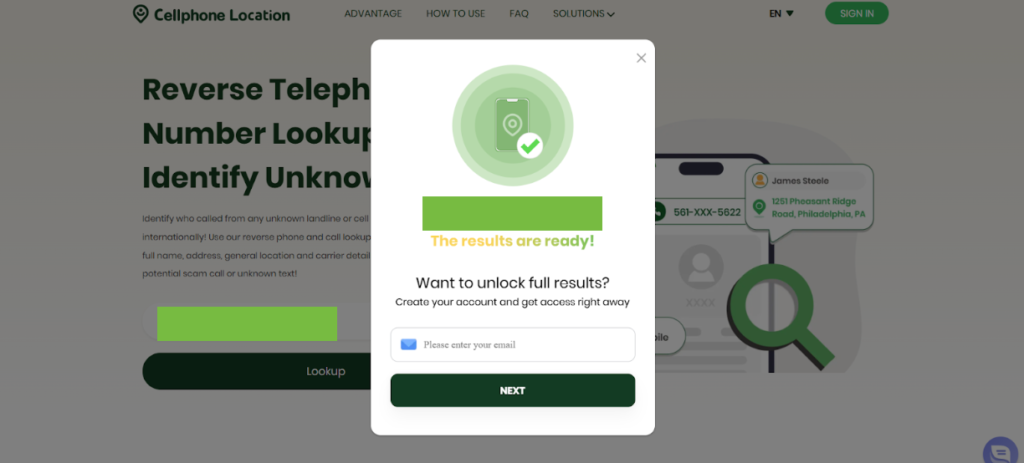
- Forneça seu endereço de e-mail para receber os detalhes.
- Analise os resultados disponíveis nos perfis públicos e verifique se há alguma referência relacionada ao Pinterest.
Perguntas frequentes
- Como fazer encontrar alguém no Pinterest Sem saber o nome de usuário deles?
Mesmo sem um nome de usuário, você pode localizar alguém pesquisando seu nome real, sincronizando contatos, explorando perfis sugeridos, navegando em pastas baseadas em interesses, verificando conexões em comum ou usando o Google para encontrar perfis públicos do Pinterest associados ao nome ou conteúdo da pessoa.
- Alguém pode verificar se você os procura no Pinterest?
Não, o Pinterest mantém as buscas completamente privadas. Os usuários nunca são notificados se alguém pesquisar seu perfil, pastas ou pins. Você pode pesquisar livremente sem se preocupar com a possibilidade de a pessoa descobrir, tornando todos os métodos de descoberta discretos e seguros.
- Como encontrar uma pessoa específica no Pinterest?
Para encontrar alguém com precisão, combine várias abordagens: pesquise por nome de usuário ou nome, sincronize contatos, verifique seguidores em comum, explore pastas com base em interesses, use perfis sugeridos e pesquise externamente no Google para verificar se a conta pública do Pinterest está correta.
Conclusão
Encontrar alguém no Pinterest é possível por diversos métodos, mesmo com informações limitadas. Desde buscas diretas por nome de usuário até sincronização de contatos e ferramentas externas, cada abordagem aumenta suas chances de sucesso. Combinando esses nove métodos, você pode buscar pessoas no Pinterest de forma eficiente, respeitando a privacidade e as diretrizes da plataforma.
 Portuguese
  English